

If you’re an ASP.NET developer, there’s a good chance you’ve heard of the ELMAH project. In case you haven’t, ELMAH (Error Logging Modules and Handlers) is a series of HTTP modules and an HTTP handler that may be added to your ASP.NET web applications for the purpose of tracking unhandled exceptions. ELMAH provides access to view these errors by way of a web console, email notifications and an RSS feed.
So where does ELMAH store all of these exceptions as they’re raised? The answer, fortunately, is that it’s configurable. Out of the box, ELMAH ships with providers for several relational databases (remember those?), an in-memory store and XML files. Though not in the box, you are now able to add Couchbase to the list of available entry logs. Yesterday, I posted the ELMAH Couchbase provider to Couchbase Labs – https://github.com/couchbaselabs/elmah-couchbase.
Why use Couchbase for ELMAH? If some part of your application suddenly starts throwing exceptions, do you want to be clogging your over-taxed RDBMS with writes or would you rather hand over logging responsibility to a database that can handle tens-if-not-hundreds of thousands of operations per second on a single node. OK, hopefully you’re application isn’t going to need that kind of throughput for logging exceptions. But if that day comes…
To get started with the new provider, you’ll need fist to install ELMAH (try the Nuget package that includes configuration, not core). For more information on how to setup ELMAH. After installed, grab the Couchbase ELMAH Log Entry source from GitHub or get the latest Nuget package. Configure ELMAH to use the new error log in Web.config.
<elmah>
<errorlog couchbaseconfigsection=“” type=”Elmah.Couchbase.CouchbaseErrorLog, Elmah.Couchbase” />
>
<errorlog couchbaseconfigsection=“” type=”Elmah.Couchbase.CouchbaseErrorLog, Elmah.Couchbase” />
>
On the server side, you’ll need to use Couchbase Server 2.0. You can try any of the latest 2.0 server builds or Developer Preview 4 available at the Couchbase downloads page. Once installed, you’ll need to create a view named “by_date” in a design document named “errors.” The code for the view is also available in the source in a file named “CouchbaseErrorLog.json.” For information on creating views, see the web console guide for 2.0.
function (doc) {
if (doc.Exception) {
emit(doc.Time, null);
}
}
if (doc.Exception) {
emit(doc.Time, null);
}
}
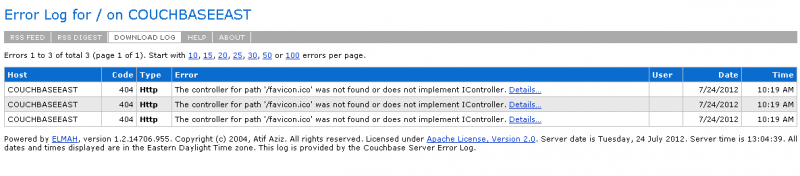
After you create the view and publish it as a production view, you’re all setup and ready to use Couchbase with ELMAH. Cause an unhandled exception in your application (a 404 works well) and request the resource “elmah.axd” from the root of your site (i.e., http://localhost:34636/elmah.axd). You should see a list of errors like below:
As a reminder, the Couchbase ELMAH Error Log is a Couchbase Labs project and not an official Couchbase project. You’re free to use it in your application, but support and maintenance are limited. If you do find issues, please feel free to fork and send a pull request or pose questions in the forums.


I\’m having some trouble getting up and running with this. I\’m seeing the following error:
\”Operation is not valid due to the current state of the object\” when iterating over the result from GetView in GetErrors().
My problem seems to be the same as one already posted on the couchbase forums (unanswered):
http://www.couchbase.com/forum…
Can anyone advise?
Duplicate question – can\’t delete.
Anthony –
What version of the SDK are you using? Can you perhaps try updating the version to the latest (1.3.7 at time of writing) and see what happens?
Also, we have a Q&A forum (http://www.couchbase.com/commu… and/or you can use Jira (http://www.couchbase.com/issue… if you think you may have found a bug.
Thanks,
Jeff